
How to Identify AI-Ready Business Processes
NWA AI Team
Editor

How to Identify AI-Ready Business Processes
AI-ready business processes are workflows that can be improved with artificial intelligence to save time, reduce errors, and boost productivity. These processes share three key traits: they are repetitive, rule-based, and data-driven. Tasks like invoice processing, customer support ticket routing, or inventory updates are typical examples.
Why Focus on AI-Ready Processes?
- Cost Savings: 40% of businesses using AI report reduced costs.
- Revenue Growth: 60% of AI adopters see increased revenue.
- Productivity Boost: 74% of automation users work faster, and 88% trust AI to minimize errors.
Steps to Identify AI-Ready Processes:
- Inventory Current Workflows: Map out all processes, including informal ones, using tools like Miro AI or Notion AI.
- Spot Repetitive, High-Volume Tasks: Focus on rule-based tasks with predictable outcomes that occur frequently.
- Evaluate Data Readiness: Ensure your data is structured, accurate, and accessible for AI use.
- Analyze Decision Points: Target processes with consistent, rule-based decisions.
- Estimate ROI: Calculate potential savings and prioritize tasks with high impact and low implementation effort.
- Run Pilot Projects: Test AI on small, manageable workflows to validate its effectiveness before scaling.
AI adoption starts with identifying the right processes. Begin with small, high-impact tasks and prepare your team with training to ensure long-term success.
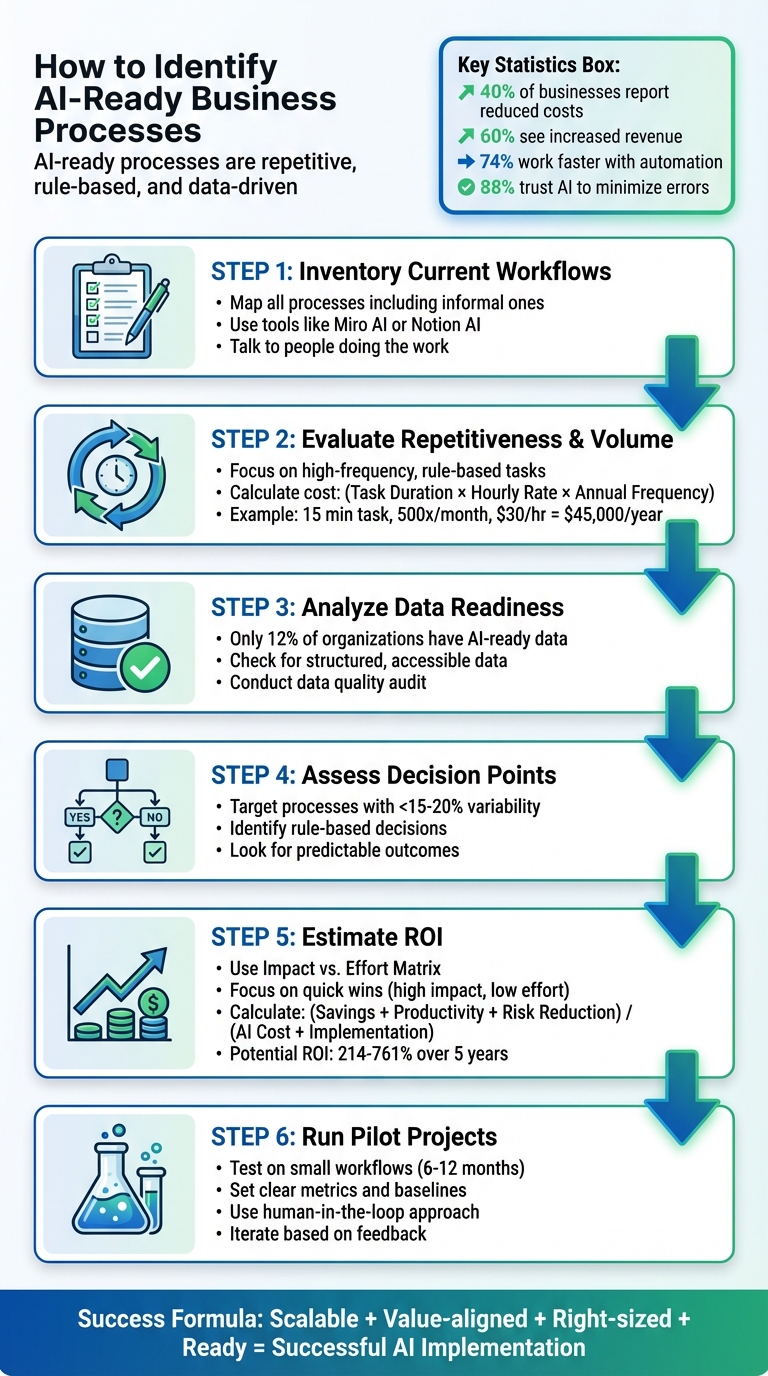
6-Step Process to Identify AI-Ready Business Processes
How to Use AI to AUTOMATE Your Business Processes!
Step 1: Create a Complete Inventory of Business Processes
To effectively integrate AI into your operations, you first need a clear picture of your current processes. Many companies operate with a mix of formal documentation and informal "tribal knowledge" that exists only in employees' minds. Think of Business Process Analysis as your company's MRI - it uncovers hidden inefficiencies and workflow bottlenecks that might otherwise go unnoticed.
Your objective here is straightforward: map out how work actually gets done in your organization, not just how it’s supposed to happen on paper. It's common for documented procedures to differ from real-world practices, so skipping this step could lead to a flawed AI implementation strategy.
Document Existing Workflows
Start by creating visual flowcharts to represent your operations. These diagrams help you pinpoint where work slows down or breaks apart. Use standard mapping symbols - like ovals for start/end points, rectangles for actions, diamonds for decisions, and arrows for flow - to maintain consistency.
For each workflow, identify the starting point (what triggers the process) and the end point (what marks its completion). Then break the process into 5–15 key steps, highlighting any decision points and assigning accountability for each task. This structured approach ensures your documentation remains clean and consistent across all departments.
Modern AI tools like Miro AI, Notion AI, and Whimsical AI can simplify this process by converting text descriptions or interview notes into visual maps in just minutes. Many of these platforms offer free trials or limited free versions, making them accessible for initial mapping efforts.
Don’t rely only on existing documentation. Talk to the people doing the work. Stakeholder interviews can uncover undocumented workarounds, exceptions, and shortcuts - key areas where AI could provide real value.
Once you’ve mapped out the workflows, group them logically to focus your AI optimization efforts.
Categorize Processes by Function
With your workflow maps in hand, the next step is to organize processes into functional groups. One common method is departmental grouping, where you sort workflows by core areas like Finance, HR, Sales, Customer Service, and IT. This approach makes it easier to identify department-specific bottlenecks and assign clear ownership for improvement initiatives.
Alternatively, you can categorize tasks by their automation suitability - grouping processes based on characteristics that make them ideal for AI, such as repetitiveness, clear if-then logic, high volumes, or frequent errors.
Another option is tool-based categorization, where you group workflows by the type of AI technology they require. For example:
- Robotic Process Automation (RPA) for rule-based tasks on legacy systems.
- Workflow automation to connect different cloud applications.
- Generative AI for tasks like content creation or communication.
This method allows you to match the right technology to each process from the outset.
Finally, use an Impact vs. Effort Matrix to prioritize which processes to tackle first. Focus on the "quick wins" - tasks that offer high impact with minimal effort. These will be your starting points as you move forward with AI adoption.
Step 2: Evaluate Processes for Repetitiveness and Volume
After mapping out your workflows, the next step is figuring out which tasks are suitable for automation. Not every process benefits from AI, so it’s essential to focus on repetitive, high-frequency tasks that consume significant staff time.
Identify High-Frequency, High-Volume Tasks
Start by zeroing in on tasks that follow a predictable, rule-based structure and occur frequently enough to make automation worthwhile. These are tasks that rely on clear "if-then" logic, happen daily or weekly, and involve processing large amounts of data - too much for manual handling to be efficient.
To determine the true cost of a manual task, use this formula:
(Task Duration in Hours) x (Employee Hourly Rate) x (Annual Frequency).
For instance, if processing invoices takes 15 minutes per transaction, happens 500 times a month, and involves employees earning $30 per hour, the monthly cost is $3,750 - or $45,000 annually. That’s a significant expense for a task that AI could easily manage.
Some common examples of high-frequency tasks ripe for automation include:
- Categorizing emails
- Extracting data from invoices or receipts
- Pre-screening loan applications
- Updating CRM systems
- Transferring files between platforms
These tasks not only generate the large datasets needed for training AI models but also free up employees to focus on more strategic and meaningful work.
While this quantitative analysis is crucial, pairing it with feedback from employees can help uncover areas where manual processes create unnecessary friction.
Assess Manual Effort and Pain Points
In addition to frequency, it’s important to identify where manual work creates bottlenecks or leads to errors. Watch for recurring workflow slowdowns, high error rates during data transfers, or signs of burnout among employees stuck with repetitive, low-value tasks. Research shows that 74% of automation users report faster workflows, and 88% trust automation tools to handle tasks more accurately than manual entry.
Gather employee feedback through surveys, workshops, or even informal channels like Slack. Ask them to highlight daily frustrations, whether it’s reactive reporting, overwhelmed teams, or processes that can’t scale. These pain points often signal where AI can provide immediate relief and deliver measurable results.
Step 3: Analyze Data Readiness and Quality
Once you've pinpointed high-volume tasks for AI, it's time to assess whether your data is up to the challenge. Surprisingly, only 12% of organizations say their data is ready for AI. This means most businesses will need to take a hard look at their existing data before moving forward.
It's important to note that data suitable for traditional analysis isn't necessarily ready for AI. As Rita Sallam from Gartner points out:
High-quality data - as judged by traditional data quality standards - does not equate to AI-ready data.
In other words, what works for human analysis or spreadsheets won't always meet the demands of machine learning.
Check for Structured and Accessible Data
AI models thrive on standardized, well-organized data. This means your information should be formatted consistently - think databases, CRM systems, or properly structured spreadsheets. However, structure alone isn't enough. Your data also needs to be accessible across systems while adhering to security and regulatory requirements like GDPR or HIPAA.
Start by cataloging all your organization's data sources, including both structured formats (like databases or CRM entries) and unstructured ones (such as emails, social media posts, or multimedia files). Mapping how data flows between departments can help you identify silos, bottlenecks, or untapped resources that could support AI initiatives.
By ensuring your data is both structured and accessible, you'll create a solid foundation for evaluating overall readiness.
Conduct a Data Readiness Audit
A thorough audit is essential to ensure your data meets the needs of your AI project. This means checking for accuracy, consistency, completeness, and proper labeling. You’ll want to flag issues like duplicate entries, missing values, formatting errors, or inconsistent field names - problems that can confuse AI algorithms.
Focus your efforts on the specific AI use case you’re pursuing. For instance, data suited for predictive maintenance may not work for a generative AI customer service tool. As Ken Boyer, Director of Product Development at Domo, aptly puts it:
Inputting poor data into an AI tool is not going to provide you with valuable insights. As the saying goes, 'garbage in, garbage out'.
To streamline the process, consider using automated tools to detect errors, remove duplicates, and standardize data fields. That said, automation isn’t foolproof. A human-in-the-loop approach, where experts review and validate edge cases or correct mislabeled data, can make a big difference. This ensures your datasets are not only technically accurate but also contextually meaningful for the AI solutions you’re building.
Step 4: Assess Rule-Based Decision Points
Now that you've mapped out your processes and evaluated your data, it's time to zero in on rule-based decision points that consistently produce reliable results. When your data is prepared and structured, these processes naturally become prime candidates for AI. Focus on workflows with less than 15–20% variability - these are the ones that deliver predictable outcomes. For example, you might set up a rule where invoices over $10,000 automatically require managerial approval, or overdue customer accounts trigger reminder emails after 30 days. Think about tasks your team handles the same way every time, like initial checks on loan applications, basic insurance claim reviews, or routing customer inquiries based on specific keywords. These repetitive, checklist-driven tasks - where subjective judgment isn't involved - are perfect for automation.
Identify Processes with Predictable Outcomes
Processes with minimal variation are a great starting point for automation. Look for high-volume tasks that demand a lot of manual effort but don’t require creative thinking or complex judgment. Start by documenting each decision point, along with the inputs and outputs, and separate the steps that follow strict rules from those that need human discretion. The more consistent the process, the easier it is to automate quickly and effectively. As Satya Nadella, CEO of Microsoft, puts it:
AI will not replace humans, but it will amplify our abilities.
Spot Opportunities for AI-Augmented Decision Making
Full automation isn’t always the answer. Some processes benefit more from a hybrid approach, where AI handles the heavy lifting - like analyzing data or generating recommendations - while humans make the final decisions. This method works well for tasks with a bit more variability or those requiring occasional judgment. For instance, your team might spend hours assessing credit risk, managing inventory levels, or screening job candidates. AI can sift through massive datasets to surface actionable insights, allowing your team to focus on the strategic calls. This hybrid model not only saves time but also sets the foundation for more advanced AI applications in the future.
sbb-itb-e5dd83f
Step 5: Estimate ROI and Implementation Feasibility
Once you’ve identified processes and ensured data readiness, the next step is to evaluate the potential return on investment (ROI) and the feasibility of implementing AI solutions. This step is critical for making informed decisions about where and how to invest in AI. Start by calculating your AI ROI using this formula: (Annual Cost Savings + Value of Increased Productivity + Value of Risk Reduction) / (Cost of AI Solution + Implementation Costs). For instance, when Chobani adopted AI for financial process automation in September 2025, they managed to cut down the time spent on expense reports by 75%, allowing their finance team to focus on strategic tasks like analysis and compliance.
Rank Processes by Impact and Feasibility
To determine where to begin, use an impact-effort matrix to rank potential processes. This helps pinpoint "quick wins", or projects that offer high value without demanding extensive effort. Evaluate impact across four main categories:
- Cost optimization: Savings from reducing manual tasks.
- Revenue growth: Faster deal cycles or higher transaction values.
- Risk mitigation: Enhancements in compliance and fraud prevention.
- Decision quality: Improved outcomes through data-driven insights.
On the feasibility side, assess factors like data readiness, current technical infrastructure, and the time required to move a solution into testing. Don’t overlook the cost of inaction, such as lost revenue or falling behind competitors, when calculating ROI. For example, integrating AI into customer experience or ERP systems can yield a conservative 214% ROI over five years, with potential to climb as high as 761% with optimal improvements. A case in point: Microsoft streamlined its supply chain forecasting in September 2025, cutting manual planning by 50% and boosting on-time planning by 75%. These benefits often grow over time, further justifying the investment.
Focus on Quick Wins
Quick wins are an excellent way to test assumptions, validate ROI projections, and build confidence among stakeholders. Start with small, high-impact processes that can be implemented in under six months using readily available tools that require minimal customization or data integration. Examples include AI-powered customer service agents, automated expense reporting, or inventory management systems.
Step 6: Test with Pilot Projects
Once you've assessed your processes and identified opportunities, it's time to put your AI plans to the test with pilot projects. These pilots serve as a way to validate your AI assumptions in a controlled setting. To ensure success, keep the scope manageable and set clear objectives that align directly with your business goals. The key to selecting the right pilot lies in this formula: Scalable + Value-aligned + Right-sized + Ready = Successful use case. In practical terms, this means focusing on processes involving just one or two systems or decision points to avoid unnecessary complexity.
Set a timeline of 6–12 months with specific milestones to measure progress. Bring together a team that includes technical experts, leadership, and AI advocates to ensure smooth adoption. Before you start, define baseline metrics - like processing times, error rates, and cost per transaction - so you can compare AI's performance to your current methods. It's worth noting that most AI project failures (around 70%) stem from human factors, such as resistance to change or unclear expectations, rather than technical flaws.
Use AI Process Mapping Tools
AI-powered process mapping tools can be a game changer. These tools use machine learning and natural language processing to create dynamic, real-time workflow maps that go far beyond the limitations of static flowcharts. For example, they can analyze transcripts from interviews with process owners and generate initial maps in just days, not weeks. Tracy Dixon, Operational Modernization Partnership Lead at Centric Consulting, highlights this advantage:
AI has allowed UiPath to be less rigid in its requirements... handle more complex, long-running processes and provide more opportunities for the kind of human-in-the-loop functionality you need to map processes.
By feeding your documented workflows into these tools, you can quickly identify bottlenecks and simulate potential improvements before committing time and resources.
Iterate and Learn from Pilots
During the pilot phase, adopt a human-in-the-loop approach. This means having employees review and validate AI decisions before they impact customers or operations. Set up weekly feedback sessions and use dashboards to monitor usage, spot anomalies, and ensure compliance. Equip your teams with concise training materials to help them interpret AI recommendations and, when necessary, override them.
If things don't go as planned, use the feedback to refine your approach. Research shows that organizations with a systematic method for identifying and selecting use cases are more than twice as likely to scale their AI initiatives successfully compared to the average company. As Neel Balar, Co-founder & CBO at Clueso, explains:
Being AI-ready is the new baseline. The faster you build it, the more freedom you'll have to innovate.
Use the insights gained from your pilots to fine-tune your AI strategy, streamline training, and encourage broader adoption across your organization.
Integrate NWA AI Training for AI Implementation
After completing your pilot projects, the next step is equipping your team with the skills needed to maintain and expand AI adoption. Structured training acts as the bridge between advanced technology and practical business results. NWA AI offers specialized programs tailored to help organizations in Northwest Arkansas build AI knowledge and improve workflows - without requiring coding expertise. By investing in targeted training, you can turn pilot project wins into sustainable, long-term AI success.
NWA AI Programs for Building AI Skills and Improving Workflows
NWA AI provides three distinct training tracks designed to meet organizations at different stages of AI readiness:
- AI Literacy: Focuses on mastering the basics and addressing the "mindset gap."
- AI Leverage: Offers hands-on training for practical workflow improvements.
- AI Adoption: Prepares leadership to drive organizational change and measure ROI effectively.
This foundational training is essential, especially as AI literacy tops the list of in-demand skills for 2025. These programs also emphasize critical areas like AI governance, ethics, and responsible data usage, creating a secure framework for AI experimentation.
As Wyatt Mayham, Founder of Northwest AI Consulting, points out, "Culture drives success." Comprehensive assessments, which typically take 4 to 8 weeks and require collaboration across departments, are key to resource planning and achieving early ROI.
Strategies for Implementing AI Across Your Organization
Once your pilot projects are successful, NWA AI’s approach helps organizations overcome resistance and ensure smooth implementation. Their training guides leaders in identifying "quick wins" - AI applications that are both impactful and easy to execute. These early successes can build momentum and highlight measurable ROI, making it easier to gain buy-in for further adoption.
To ensure progress, the program teaches how to use familiar prioritization tools to focus on these quick wins while developing phased roadmaps. These roadmaps typically include:
- Short-term goals (3–6 months): Address foundational needs like creating AI ethics guidelines.
- Medium-term initiatives (6–18 months): Build core infrastructure to support broader AI integration.
- Long-term objectives (18–36 months): Focus on advanced innovation and scaling efforts.
This phased approach is especially important since technology costs often account for 40% to 60% of AI maturity improvement budgets. Careful resource planning ensures these investments deliver maximum value. Organizations that conduct thorough assessments before making major AI investments consistently achieve better results.
Conclusion: Start Identifying and Optimizing AI-Ready Processes
Key Takeaways from the Guide
This guide breaks down how to identify and refine processes that are ideal for AI integration. Start by mapping out your workflows to spot bottlenecks and manual tasks slowing you down. Pay special attention to repetitive, rule-based tasks that occur at high volumes - these are prime candidates for AI. Before diving in, perform a detailed data readiness audit to ensure your data is accurate, complete, and well-structured. As Ken Boyer, Director of Product Development at Domo, wisely notes:
Inputting poor data into an AI tool is not going to provide you with valuable insights. As the saying goes, 'garbage in, garbage out'.
To prioritize your efforts, use an Impact vs. Effort Matrix. This tool helps you focus on projects that offer significant business benefits while being relatively easy to implement. Start with small pilot projects to test the waters, gather feedback, and refine your approach before scaling up. With the use of generative AI doubling in just a year - 65% of organizations are now using it regularly as of 2024 - the momentum for AI adoption is undeniable.
Once you've identified AI-ready processes, the next step is preparing your workforce for successful implementation.
Next Steps for AI Adoption
The leap from identifying opportunities to implementing AI hinges on workforce readiness. Unfortunately, over half of employees feel they lack sufficient AI training, which can slow down adoption efforts. Structured training programs can make all the difference between stalled pilot projects and scalable AI success.
NWA AI offers a three-track program - AI Literacy, AI Leverage, and AI Adoption - designed to equip your team with the knowledge and tools they need. These programs provide practical training and clear governance frameworks, empowering your workforce to implement AI-driven workflows effectively, all without requiring coding expertise.
FAQs
What steps should I take to determine if a business process is ready for AI?
To figure out which business processes are ready for AI, start by mapping out your workflows and breaking them down into smaller tasks. Pay close attention to tasks that are repetitive, follow clear rules, or involve managing large volumes of data. These are often the best candidates for automation. Look for inefficiencies like bottlenecks, frequent mistakes, or tasks that contribute to employee fatigue.
Next, calculate the cost of handling these tasks manually. This means adding up the time and labor costs associated with each one. It's also important to check if your data is ready for AI - this requires having enough data that's clean, well-organized, and easy to use. Once you've done this, focus on processes that offer the greatest potential for automation, the strongest return on investment (ROI), and the best alignment with your business goals.
NWA AI provides training and tools to help businesses evaluate and implement AI solutions, no coding experience needed.
How can I prepare my data for AI integration?
To get your data ready for AI integration, begin by assessing its completeness, accuracy, and any possible biases. Make sure to clean and standardize the data, applying consistent labels and metadata throughout. It's also crucial to implement clear governance policies and set up secure access controls to safeguard sensitive information. Lastly, store your data in a centralized system that can scale as needed and supports real-time retrieval, ensuring smooth model training and effective AI deployment.
What factors should I consider when calculating the ROI of an AI project?
To figure out the ROI of an AI project, the first step is to tie the initiative to a specific business goal. This could mean cutting costs, speeding up decision-making, or enhancing customer satisfaction. Start by measuring the current performance of the process you want to improve - whether that's the number of labor hours, error rates, or revenue per transaction. This gives you a baseline to compare against once the AI system is in place.
Next, calculate all associated costs. This includes expenses like software or cloud subscriptions, data preparation, model training, integration efforts, and employee training. Tools and programs, such as those from NWA AI, can help streamline the process and minimize unexpected costs. Then, estimate the potential financial benefits. For example, think about savings from reduced labor hours, increased revenue from better personalization, or fewer errors that require fixing.
Finally, develop a plan to measure results over time. This should cover both short-term wins and long-term performance, considering things like ongoing maintenance, data quality improvements, and adjustments to keep the AI aligned with changing business needs. By addressing risks - like data availability or integration hurdles - you can create a solid, data-backed case for your AI investment and set it up to deliver consistent value.
Build real AI capability on your work
The AI training programs are part of how Northwest Arkansas is approaching AI adoption.
Get involvedRelated Articles

ROI and KPIs in AI Process Optimization
Measure AI impact with ROI and KPIs: set baselines, track hard and soft ROI, and monitor model, system, and business KPIs to validate performance and value.

How Blended Learning Improves AI Upskilling
Blended learning, online modules plus hands-on workshops, boosts AI skill retention, engagement, and real-world application for faster workplace upskilling.

5 Steps to Define AI Workflow Goals
Set measurable AI workflow goals in five steps: map processes, set SMART targets, pinpoint AI opportunities, define KPIs, and align with strategy.