
5 Steps to Define AI Workflow Goals
NWA AI Team
Editor

5 Steps to Define AI Workflow Goals
AI projects often fail because organizations lack clear goals. To avoid wasting resources, it's essential to set specific, measurable objectives that solve real problems. Here's how to define AI workflow goals in five steps:
- Review Current Workflows: Identify inefficiencies and repetitive tasks by mapping real-world processes.
- Set SMART Goals: Create goals that are Specific, Measurable, Achievable, Relevant, and Time-bound.
- Pinpoint AI Opportunities: Focus on tasks that are repetitive but require contextual understanding.
- Define Key Performance Indicators (KPIs): Track metrics like time saved, error rates, or cost reductions to measure success.
- Align AI with Business Strategy: Ensure AI goals support broader organizational priorities and gain team buy-in.
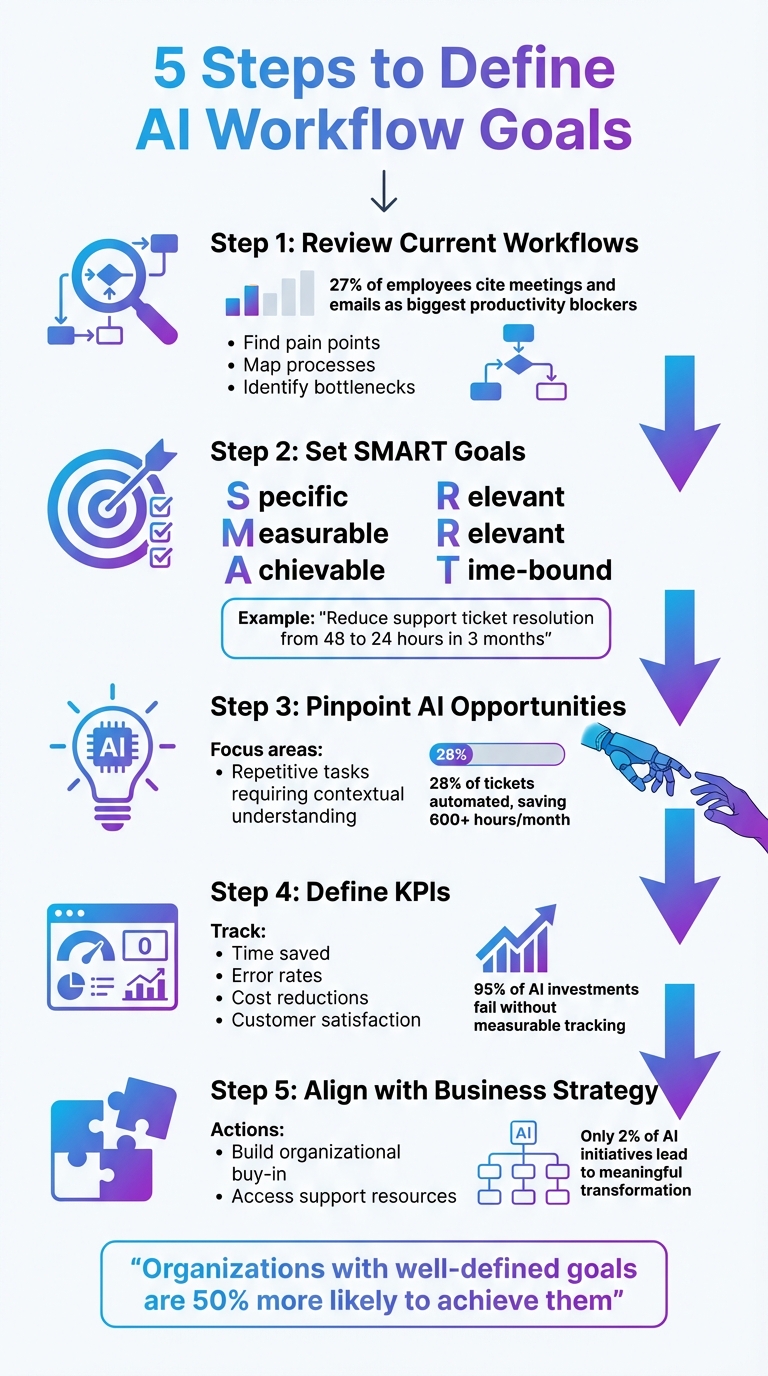
5 Steps to Define AI Workflow Goals
CREATE YOUR OWN A.I WORKFLOW
Step 1: Review Your Current Workflow Processes
Before setting any AI goals, take a close look at how your workflows actually function on a daily basis. Skip the idealized process maps and focus on capturing the real-world operations.
Talk to the employees who work on the frontlines. They’re the ones who can tell you where communication breaks down, which manual tasks slow things down, and what repetitive work leaves them frustrated. For instance, about 27% of employees say that meetings and emails are the biggest productivity blockers they face.
Find Workflow Pain Points
The easiest way to spot where AI can make a difference? Look for those "Ugh!" moments - those repetitive, energy-draining tasks that no one enjoys doing. These are prime opportunities for AI to step in.
Some common areas to target include tasks that are repeated often, manual data entry prone to errors, slow approval processes, or inconsistent onboarding practices. Take Remote, a global HR platform with over 1,800 employees, as an example. Their IT team was drowning in support tickets - handling 1,100 tickets a month with just three people by August 2025. By introducing an AI system powered by ChatGPT, they automated 28% of ticket handling, saving over 600 hours each month.
To prioritize these pain points, use a simple 1–5 scale (1 = minor issue, 5 = critical problem). This scoring system can help you figure out which workflows to address first. Pay attention to two main types of bottlenecks: performer-based bottlenecks, where teams lack clarity or resources, and systems-based bottlenecks, where outdated tools or software are slowing things down.
Once you’ve rated the pain points, document the workflow in detail to pinpoint exactly where the inefficiencies lie.
Map Out Current Processes
After identifying the most pressing issues, create a detailed map of the workflow. This means breaking down every step, from start to finish, and defining clear start and end points - what kicks off the process and what marks its completion. Include every action, handoff, and decision point along the way.
For clarity, use simple visual tools like ovals, rectangles, and arrows to map things out. The goal isn’t to overcomplicate but to make everything easy to understand. Companies that use process mapping often see a 20–30% jump in efficiency.
Assign responsibility for each step using job titles instead of individual names. This ensures the process remains consistent even if team members change roles. For workflows that span multiple teams, a RACI framework (Responsible, Accountable, Consulted, Informed) can help clarify who’s responsible for what. Store these maps in a centralized, searchable location - like a wiki or a cloud-based knowledge base - so remote and hybrid teams can access them easily.
Finally, ask your team to identify three tasks where AI could save five hours of administrative work each week. Their input will highlight the areas where automation can make the biggest impact.
Step 2: Set SMART Goals for AI Workflow Integration
After reviewing your workflows in detail, the next step is to turn those insights into actionable goals. To keep your AI initiatives on track and prevent them from veering off into unproductive experiments, use the SMART framework: Specific, Measurable, Achievable, Relevant, and Time-bound. This approach ensures your efforts remain focused and deliver measurable value.
Here’s a quick test to check if your goal is clear: Can you explain in one sentence how AI solves a real problem? If not, your goal might be too vague.
"If you can't explain how AI solves a real business headache in one sentence, you're not ready to implement it. Start with the problem that makes you go 'Ugh!' – then figure out if AI is the aspirin." - WorkflowGuide
For example, instead of a broad goal like "improve customer service", aim for something more precise, such as: "Reduce average support ticket resolution time from 48 hours to 24 hours within three months."
Once your goals are defined, the next step is aligning them with your overall business objectives.
Connect Goals with Business Objectives
Your AI goals should tie directly to key priorities like cutting costs, increasing accuracy, or enhancing customer experience. Successful AI programs don’t start with the technology - they start with a clear business need. Identify pain points in your processes, such as repetitive tasks, data-heavy operations, or areas prone to errors, and address them systematically.
Collaborate with teams like finance, legal, and operations to uncover inefficiencies and improve decision-making. Ask specific questions, such as:
- "What inefficiencies are costing us time or money?"
- "How can AI improve our customer experience?"
- "Which outcomes need to be better?"
For instance, if your sales team spends 15 hours a week manually enriching leads, a relevant goal could focus on automating that process to free up time for more strategic work.
Examples of SMART AI Workflow Goals
Concrete examples show how well-defined SMART goals can lead to measurable success:
- ActiveCampaign tackled a 25% churn rate among users who lacked personalized onboarding. Their SMART goal was to reduce early churn by 15% and double product adoption within 90 days. They implemented an AI-powered system to tag new signups by language and enroll them in relevant webinars. The results? A 440% increase in webinar attendance, a 15% drop in early churn, and a twofold increase in product adoption - all within 90 days.
- Popl, a digital business card company, aimed to save $20,000 annually by automating lead enrichment and routing. By integrating OpenAI with their HubSpot and Salesforce CRMs, they triaged inbound emails and filtered spam in real time. This eliminated manual data entry and achieved their savings goal.
Here’s a quick look at how different departments can set SMART goals:
| Department | SMART Goal Example | Measurable Metric (KPI) |
|---|---|---|
| Sales | Automate lead enrichment and routing within 60 days | Reduce manual lead response time by 50% |
| Customer Success | Summarize customer feedback sentiment by Q2 2026 | Decrease churn rate by 10% |
| IT / Support | Triage and resolve common queries within 90 days | Automate 30% of tickets |
| HR / People Ops | Automate new hire onboarding by March 2026 | Save 5 hours per new employee |
Defining success metrics - like accuracy, speed, cost savings, or customer satisfaction - before you start is crucial. These benchmarks act as a roadmap, helping you measure whether your AI investment is delivering the results you need.
Step 3: Determine Where AI Can Add Value
With your SMART goals in place, it's time to identify tasks that drain your team's energy and require a level of contextual understanding that traditional automation can't manage.
Think about what experts call "sigh tasks" - those tedious, repetitive jobs that make your team take a deep breath before tackling them. These tasks are predictable enough to automate but still require some contextual judgment, making them ideal for AI. For instance, AI can help prioritize support tickets based on tone and urgency, summarize lengthy documents into actionable insights, or even route emails by intent rather than relying solely on keywords. The next step is to review your daily workflows and pinpoint tasks where AI can make a noticeable impact.
Consider this: 27% of employees cite meetings and email responses as their biggest productivity drains. Organizations that have implemented AI in IT support have reported resolving 28% of tickets automatically, saving teams more than 600 hours per month.
Review Routine and Repetitive Tasks
Focus on high-volume, repetitive tasks like idea generation, document formatting, or condensing emails. AI shines in these areas, handling them faster and more consistently than manual efforts.
Look for tasks that have become purely habitual - things like creating standardized reports no one reads, producing weekly summaries from templates, or repetitive data entry done just because "that's how it's always been." These are perfect candidates for AI. For example, Remote, a global HR platform with over 1,800 employees, uses ChatGPT and Zapier to manage 1,100 monthly IT support tickets with a team of just three people. By August 2025, their AI system was classifying and prioritizing issues, suggesting solutions based on past cases, and even drafting responses. It now handles 28% of all tickets automatically, saving the team over 600 hours each month.
"AI workflows take the judgment calls you make every day and turn them into something your business can scale." - Nicole Replogle, Staff Writer, Zapier
When assessing tasks for AI, ask yourself: Can I break this process down step-by-step? If the answer is yes, but the task still feels like a drain, it’s a strong candidate for AI. For sensitive tasks, such as legal reviews or customer-facing communications, integrate a human-in-the-loop approach, where a person provides final approval.
Use Hands-On Training Resources
After identifying tasks for AI, make sure your team has the tools and training to implement these solutions effectively. Spotting opportunities is one thing, but knowing how to put them into action - especially without a technical background - is another challenge. Programs like NWA AI (Northwest Arkansas AI Innovation Hub) offer interactive, hands-on training tailored for non-technical professionals, helping teams build confidence and skills.
Before rolling out any AI solution, conduct a skills assessment to identify knowledge gaps within your team. Start small - choose one or two repetitive processes that are time-consuming or error-prone. These "quick wins" can demonstrate value and build trust in AI before scaling up to tackle more complex workflows.
sbb-itb-e5dd83f
Step 4: Set Key Performance Indicators (KPIs)
Once you've pinpointed where AI can add value, the next step is to define clear KPIs. Start by recording baseline metrics for 8–12 weeks before introducing AI. This will give you a solid foundation for measuring ROI. Surprisingly, 95% of AI investments fail to deliver measurable returns, not because they lack value but because organizations often struggle to track and quantify it. To avoid this pitfall, focus on metrics like task duration, error rates, customer satisfaction, and costs to establish your pre-AI benchmarks. These figures will serve as a crucial reference point for assessing efficiency and cost improvements after implementation.
Take Chobani, for example. In September 2025, the company reported a 75% reduction in the time spent on financial expense processing after using AI to automate tedious administrative tasks. This shift allowed their finance team to concentrate on strategic analysis. Similarly, Nestlé eliminated manual expense management entirely and saw a 3x boost in employee efficiency for report creation by integrating AI tools within SAP Concur.
Track Efficiency and Accuracy Gains
To measure efficiency, monitor reductions in processing time, increased output, and fewer errors. For accuracy, track how often AI delivers correct results versus mistakes. These metrics are especially vital for tasks like data entry, document classification, or customer support routing.
Here’s an example: In 2025, a major bank replaced its manual fraud detection system with a machine-learning model. By tracking KPIs, they discovered that fraud-related financial losses dropped by 60%, while false positives (transactions wrongly flagged as fraud) fell by 80%. The result? A 5x ROI in just one year.
"AI success isn't just model accuracy. It's about answering questions like: Did customer churn drop after deploying the AI model?" - Amit Kharche, AI and Data Science Strategist
Monitor ROI and Cost Savings
Beyond operational improvements, translate these gains into financial outcomes. Use the formula (Total Benefits – Total Costs) / Total Costs × 100 to calculate ROI. Another simple method is (hours saved × hourly labor costs) to determine the monetary value of time saved. It’s also essential to set goals for how teams should use their freed-up time, such as generating +25 proposals per month or speeding up responses to high-priority customers.
For instance, in 2025, SA Power Networks used AI to analyze 50 years of asset data, identifying corroding infrastructure with 99% accuracy. This initiative saved the company $1 million in just one year. Immediate savings like these are valuable, but don’t overlook long-term benefits such as reduced downtime, fewer penalties, and increased revenue. Organizations that track AI-driven KPIs are 5x more likely to achieve better alignment across departments and 3x more likely to adapt quickly to market changes.
With these KPIs in place, the next step is to tie them to broader strategic goals, ensuring your AI initiatives align with your organization’s vision and priorities.
Step 5: Connect AI Goals with Organizational Strategy
AI initiatives only make a difference when they directly tie into your organization's larger vision. To make this happen, your AI goals need to align with your business priorities and capabilities. Think of it as a two-way conversation rather than a top-down directive.
Work closely with C-level leaders to define AI's role, set investment levels, and establish adoption targets. These discussions ensure that AI isn't treated as an isolated project but becomes a key driver of competitiveness and growth. It's worth noting that only 2% of AI initiatives lead to meaningful organizational transformation, often because they fail to connect with strategic goals. This step is all about linking your technical efforts to your company’s broader strategy.
As markets evolve, business priorities shift, and risks emerge, your AI strategy must adapt. Keep a portfolio of AI projects that align with your roadmap, moving from current capabilities to future objectives. To bridge the gap between technical teams and leadership, consider appointing an AI strategist. This role translates business goals into actionable AI use cases and ensures alignment across the organization.
Build Organizational Buy-In
Gaining the support of your organization is essential for AI initiatives to succeed. Surprisingly, getting employees on board can be more challenging than the technical implementation itself. Resistance often stems from a lack of understanding or fear that AI might replace jobs.
How do you overcome this? Start by identifying internal champions - team members already using AI who can share their experiences and successes. These champions can help demonstrate how AI benefits the organization and reduce resistance across various roles. For instance, in February 2024, Netlogic CIO David Swenson introduced Microsoft Copilot for Sales to his development team. By integrating the tool into their workflow, they significantly cut down on administrative tasks, allowing more focus on core development work.
Another effective approach is creating "hero use cases" tailored to specific roles. For example, AI can draft emails for sales teams, summarize campaign results for marketing, or automate variance analysis for finance. When employees see AI solving their everyday challenges, they’re more likely to embrace it. Leadership support is equally critical. As Microsoft’s Digital People Enablement Leader Daniel Bertrand observed:
"individual contributors weren't always engaging with the Copilot unless they understood that this is something important from their managers".
Clear communication, strong leadership backing, and hands-on training can transform AI from a perceived threat into a valuable tool. While 67% of organizations using AI report having a formal strategy, many employees still don’t know how to use AI effectively or understand its boundaries.
Access Support Resources
Developing a solid AI strategy often requires expertise that many organizations lack internally. That’s where programs like NWA AI come in. NWA AI offers training designed for non-technical professionals, helping them navigate AI adoption without needing coding skills. Their programs address common challenges like overcoming resistance, measuring ROI, and driving innovation.
Through hands-on mentorship and training, NWA AI can help your team develop role-specific "hero use cases", identify internal champions, and create a roadmap aligned with your strategic goals. Their AI Literacy program ensures leadership teams grasp AI's capabilities and limits, while AI Leverage provides practical training on tools your team will actually use. These resources complement earlier steps, equipping your organization for long-term AI success. Learn more at https://nwaai.org.
Additionally, consider setting up an AI Cloud Center of Excellence (CoE) - a centralized team to oversee governance, monitor regulatory changes, and establish processes for AI-related issues. This structure ensures your AI efforts remain compliant and ethically sound as your strategy evolves.
Conclusion
Setting clear AI workflow goals isn’t about mastering technical details - it’s about having a solid strategy. By evaluating your current processes, creating SMART goals, pinpointing where AI can make a difference, tracking key performance indicators (KPIs), and ensuring alignment with your organization’s broader strategy, you can turn AI into a practical tool that delivers measurable outcomes. These steps provide a straightforward path to achieving meaningful results.
The evidence speaks for itself: organizations with well-defined goals are 50% more likely to achieve them. Success stories show that having a thoughtful, strategic approach to AI implementation - rather than deploying solutions haphazardly - can lead to significant business improvements.
You don’t need a technical background to spearhead these efforts. As WorkflowGuide wisely notes:
"If you can't explain how AI solves a real business headache in one sentence, you're not ready to implement it. Start with the problem that makes you go 'Ugh!' – then figure out if AI is the aspirin".
Your expertise in understanding customer challenges, internal inefficiencies, and strategic priorities puts you in the perfect position to lead. Plus, no-code platforms now empower you to design and deploy intelligent workflows without writing a single line of code.
Start small. Focus on measurable changes that address specific pain points, and build from there. Whether it’s leveraging hands-on training programs like those from NWA AI at https://nwaai.org or identifying internal champions to guide the process, you can turn AI from an abstract concept into a practical solution. By taking these steps, you’ll not only reduce busywork but also align AI initiatives with your organization’s strategic goals, ensuring they deliver real, lasting value.
FAQs
How can I find the best areas to integrate AI into my workflow?
To figure out where AI can make the most difference, start by mapping out your current workflow. Look for tasks that are repetitive, take up a lot of time, or are prone to mistakes. Ask yourself questions like “What tasks eat up the most hours?” or “Where do we depend heavily on data to make decisions?” It’s also helpful to involve team members who handle these tasks daily - they can often point out inefficiencies you might overlook.
Once you’ve identified these areas, prioritize them based on their potential impact. Think about how much time or money could be saved, how well the improvement aligns with your business goals, and whether you already have the data needed to implement AI. If you can sum up the problem with a clear, results-driven goal - like “cut invoice processing time by 30%” - it’s a strong candidate for AI.
To narrow down your options further, consider getting advice from experts. Resources like NWA AI – Northwest Arkansas AI Innovation Hub provide training and support, especially for non-technical professionals, to turn promising ideas into real AI solutions. Starting with a small pilot project in your highest-priority area is a smart way to test the waters before rolling out AI across the organization.
What are some examples of SMART goals for using AI in different departments?
SMART goals provide a structured way for teams to harness AI and achieve clear, measurable results. For instance, a marketing team might set a goal to boost qualified leads by 15% in Q3 using AI-powered lead scoring tools. A sales team could aim for a 10% increase in conversion rates over six months by leveraging AI-driven predictive analytics. Similarly, a customer service team might focus on cutting average handle time by 20% within 12 weeks with the help of AI chatbots.
Other practical applications include an operations team working to lower inventory-holding costs by 12% by the end of the year through AI demand forecasting. Meanwhile, an HR department might aim to shorten the time it takes to fill positions by 30% in four months using AI-powered resume screening. These examples highlight how SMART goals can ensure AI integration is intentional and delivers tangible outcomes.
How can I ensure my AI projects support my overall business goals?
To ensure your AI projects align with your business goals, begin by pinpointing the exact problem or opportunity you’re aiming to address. Clearly outline how AI can help solve that issue or achieve your objectives. After that, focus on AI use cases that offer the greatest potential to advance your goals, and establish measurable KPIs to monitor progress. Continuously assess the results of your AI initiatives to confirm they remain in sync with your overall strategy, making adjustments when necessary. This method keeps your AI efforts targeted and effective, delivering results that matter to your business.
Build real AI capability on your work
The AI training programs are part of how Northwest Arkansas is approaching AI adoption.
Get involvedRelated Articles

ROI and KPIs in AI Process Optimization
Measure AI impact with ROI and KPIs: set baselines, track hard and soft ROI, and monitor model, system, and business KPIs to validate performance and value.

How Blended Learning Improves AI Upskilling
Blended learning, online modules plus hands-on workshops, boosts AI skill retention, engagement, and real-world application for faster workplace upskilling.

Free AI Courses for Small Business Owners
Free, beginner-friendly AI courses and local workshops help small businesses automate tasks, improve marketing, and adopt AI securely without coding.