
Checklist for AI Workflow Automation Success
NWA AI Team
Editor

Checklist for AI Workflow Automation Success
AI workflow automation can save time, cut costs, and improve efficiency, but over 70% of projects fail due to poor planning. This guide breaks down the steps to succeed with automation, from preparation to scaling, with actionable tips and real-world examples.
Key Takeaways:
- Plan Ahead: Identify repetitive tasks, map workflows, and set measurable goals.
- Data Matters: Clean, accurate data is crucial for AI success.
- Start Small: Begin with a pilot project focused on high-volume, low-variability tasks.
- Build the Right Team: Include data experts, engineers, and department leads.
- Tools and Training: Choose user-friendly AI tools and upskill your team.
- Monitor and Improve: Track performance, retrain models, and expand gradually.
Examples of Success:
- Remote automated 28% of support tickets, saving 600+ hours monthly.
- Popl used AI to streamline workflows, saving $20,000 annually.
- ActiveCampaign reduced churn by 15% with personalized onboarding.
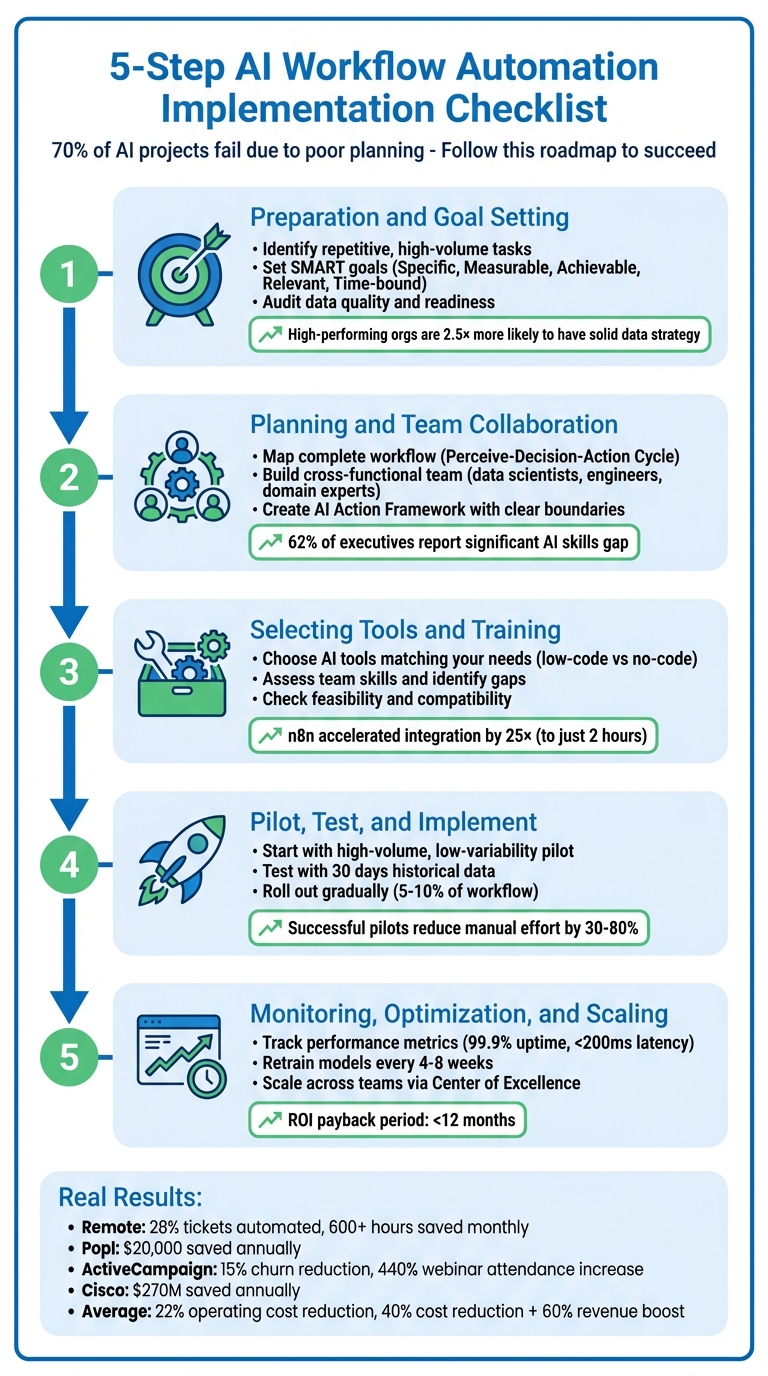
5-Step AI Workflow Automation Implementation Checklist
Step 1: Preparation and Goal Setting
Identify Automation Opportunities in Your Workflows
Start by visually mapping out your key workflows. Break them down step by step to uncover bottlenecks, redundancies, and areas reliant on manual effort. Pay attention to red flags like persistent delays, frequent errors during manual data transfers, negative feedback about slow response times, or employees feeling overburdened by repetitive tasks.
Focus on tasks that are repetitive, rule-based, and high in volume - these are prime candidates for automation. AI is particularly effective at jobs that require interpreting context, handling messy inputs, or identifying intent. To prioritize, use a scoring model that evaluates factors like task volume, repeatability, error rates, integration complexity, and potential business impact. Tools like an "Impact vs. Effort" matrix can highlight "quick wins" - projects that deliver big results with minimal effort.
To justify automation, calculate the cost of inefficiencies using this formula: (Time per Task) x (Hourly Rate) x (Frequency). This helps quantify the financial impact of manual processes. As WorkflowGuide.com aptly puts it:
"If you can't explain how AI solves a real business headache in one sentence, you're not ready to implement it".
Set Clear Goals and Define Success Metrics
Establish SMART goals - Specific, Measurable, Achievable, Relevant, and Time-bound. For example, aim to reduce manual data entry by 80% within three months or cut invoice processing time from 5 days to 1 day. Ensure these goals align with broader business objectives, such as improving customer service response times or lowering operational costs.
Measure success in four key areas: Operational Efficiency, Financial Impact, Customer Experience, and Workforce Productivity. Before launching any pilot program, define clear KPIs like error rates, time saved, or cost reductions. Companies that have successfully implemented AI report impressive results, including a 40% cost reduction and a 60% revenue boost. Setting success benchmarks early and tracking progress consistently will keep your efforts on course.
Once your goals are in place, confirm that your data and systems are ready to support AI integration.
Ensure Your Data Is Ready for AI
The quality of your data plays a critical role in determining AI success. Start by auditing your data to pinpoint gaps, duplicates, or outdated information. Assess its quality, completeness, consistency, and timeliness - clean, accurate data is the backbone of achieving your KPIs.
Check whether your data is trapped in legacy systems or isolated in departmental silos, which could block AI tools from accessing it. Also, evaluate whether your current tech stack - like CRM, ERP, or cloud services - can integrate seamlessly with AI solutions. Strong data pipelines are essential for managing the flow of information. Research shows that high-performing organizations are 2.5 times more likely to have a solid data strategy than their competitors. As Reuben Smith wisely states:
"Data quality isn't just an IT concern, it's the foundation upon which your entire AI strategy stands or falls".
Begin by working with the data you already have, improving it step by step. Set up data cleansing processes to fix errors, eliminate duplicates, and standardize formats before feeding it into AI systems. At the same time, balance the need for robust data security - especially for sensitive customer information - with the accessibility requirements AI tools need to function effectively. This is particularly important if you're dealing with regulations like GDPR or HIPAA.
Step 2: Planning and Team Collaboration
Map Out Your Complete Workflow
After identifying areas where automation can make a difference, it's time to map out your entire workflow. Create a visual representation of every step - from data capture to AI triggers and human review. This diagram serves as your blueprint, building on the goals and data readiness you’ve already established.
A key focus here is the Perceive-Decision-Action Cycle: how your AI system identifies patterns in incoming data, determines the right action based on those patterns, and then carries out that action. Pay close attention to any manual hand-offs where data moves between tools - these are prime opportunities for streamlining through orchestration. For instance, in August 2025, Popl, a digital business card company, used Zapier to automate over 100 workflows. By integrating Google Sheets for lead verification and Slack for notifying sales reps, they eliminated expensive manual processes and saved $20,000 annually.
Be sure to account for both static workflows (like "if-this-then-that" rules) and dynamic processes that rely on factors like context, sentiment, or historical data. Identify critical checkpoints where human approval is necessary - such as reviewing legal documents or financial reports - before the workflow proceeds. Also, ensure that your data is stored in structured, machine-readable formats and confirm compatibility across departments.
Build a Cross-Functional Team
Implementing AI successfully isn’t a one-department job; it requires collaboration across your organization. Assemble a team that includes data scientists for fine-tuning models, machine learning engineers for deployment, domain experts to ensure practical results, and ethics specialists to address compliance concerns. Many businesses adopt a three-tiered team structure:
- Platform Team: Manages infrastructure and security.
- Workload Teams: Focuses on business requirements within individual departments.
- AI Center of Excellence (AI CoE): Provides centralized guidance and establishes best practices.
Why is this collaboration so important? Because 62% of executives admit their organizations face a significant AI skills gap. Instead of relying solely on new hires, consider upskilling your existing workforce. For example, web developers can be retrained to use low-code AI tools. Foster a culture of learning by creating internal forums, like dedicated Teams channels, where "AI champions" can mentor colleagues and share tips. Workshops and hackathons are also great ways to generate excitement and encourage cross-team experimentation.
If your team lacks in-house AI expertise, external training programs can help. NWA AI (https://nwaai.org) offers hands-on training that equips teams to use practical AI tools and build workflows without needing advanced coding skills. Their AI Adoption program is particularly useful for developing strategies, addressing resistance, and measuring ROI - key components for successful collaboration.
Once your team is ready, the next step is to define clear operational guidelines for using AI.
Create an AI Action Framework
With your workflow map and team in place, it’s time to establish a structured framework for AI operations. Start by categorizing tasks into two groups: "Discovery tasks" (creative tasks with low risk) and "Trust tasks" (high-stakes tasks requiring precision, like credit risk assessments or compliance checks). Trust tasks demand deterministic processes and human oversight, especially since AI systems currently achieve only 58% success on single-turn tasks, dropping to 35% for multi-turn interactions.
Clearly define the boundaries for AI usage to build organizational trust. This includes setting up safeguards for data privacy, confidentiality, and bias prevention. These measures help avoid "error cascades", where one AI mistake leads to compounding errors. For critical decisions, incorporate Human-in-the-Loop (HITL) checkpoints, requiring specific individuals to review and approve AI outputs before they’re finalized.
Don’t forget to integrate measurement into your framework from the start. Establish evaluation methods to compare AI performance against human benchmarks and track key metrics like process completion times. As WorkflowGuide aptly puts it:
"Successful AI adoption is as much about your people and culture as it is about technology".
Your framework should reflect this principle, balancing automation efficiency with the human judgment needed to maintain quality and compliance.
Step 3: Selecting Tools and Training Your Team
Choose AI Tools That Match Your Needs
Once you’ve established your framework, the next step is to find the AI tools that align with your goals. Start by evaluating how well these tools integrate with your existing systems. Does the tool connect directly to platforms like Gmail, Slack, Salesforce, or HubSpot? If not, check for support for open APIs or webhooks, which can enable smoother automation workflows.
Keep your team’s technical expertise in mind when deciding between low-code and no-code platforms. For instance, no-code tools like Gumloop and Zapier are perfect for teams with no programming experience, offering simple drag-and-drop interfaces. On the other hand, low-code platforms like n8n and Pipedream allow for more customization using JavaScript or Python, making them ideal for teams with some coding knowledge. Luka Pilic, Marketplace Tech Lead at StepStone, shared that using n8n accelerated their marketplace data integration by 25×, cutting the process down to just two hours.
Look for tools that are AI-native, especially if you need to handle unstructured data like emails, documents, or social media posts. Additionally, make sure the tools comply with security and privacy regulations like GDPR, HIPAA, or CCPA if you’re working with sensitive customer data. Finally, confirm that your existing hardware and software can support these new tools. Once you’ve selected the right tools, the next step is preparing your team to use them effectively.
Assess and Upskill Your Team
Even the most advanced tools won’t deliver results if your team isn’t ready to use them. Start by evaluating your team’s current skills and identifying any gaps. A thorough skills assessment can help you understand where your team stands relative to your AI goals. Pinpoint which team members handle repetitive tasks versus those focused on strategic efforts, and identify individuals with a natural curiosity for technology - these could become your AI champions.
As Reuben Smith, AI & Automation Strategist, puts it:
"AI readiness isn't about replacing humans with robots; it's about removing the robot work from humans".
For businesses in Northwest Arkansas, NWA AI (https://nwaai.org) offers targeted training programs to enhance AI literacy. Their AI Leverage program provides hands-on experience with practical AI tools, while the AI Adoption program helps teams create effective implementation strategies and track ROI. With your team equipped, the next step is to verify that your tools and systems are compatible.
Check Feasibility and Compatibility
Before diving into full-scale implementation, ensure that your AI tools can integrate smoothly with your existing systems. Start by auditing your current software - many platforms already include built-in AI or automation features that could save you from needing additional tools. Look for accessible, well-documented APIs to facilitate data exchange and map out how the AI will interact with your databases, CRMs, and communication platforms.
Data accuracy and consistency are critical. Test the integration in a controlled environment using sample data that mirrors real-world conditions to ensure everything works as expected. Check that your IT infrastructure can handle the increased workload by reviewing rate limits and scalability requirements. Finally, define clear boundaries for what the AI will handle autonomously and what will still require human oversight. By confirming these details, you’ll set the stage for a smooth and effective implementation process.
Step 4: Pilot, Test, and Implement
Start with a High-Impact Pilot Project
Once your workflows are mapped and your team is ready, the next step is launching a pilot project that ties everything together. Focus on tasks that are high in volume but low in variability - like invoice processing, lead triaging, or sorting IT support tickets. These repetitive and predictable tasks are ideal for automation while still benefiting from AI’s ability to interpret context effectively.
Choose a pilot that addresses a specific business challenge. Look for workflows that create bottlenecks or cause frustration for your team. To decide which pilot to prioritize, use a scoring model that evaluates five factors: Volume (more than 1,000 transactions per month is ideal), Repeatability, Exception Rate (keep it under 15%), Integration Complexity, and Business Impact. Weight these categories based on your goals - commonly, 25% for volume, 20% each for repeatability and complexity. Many successful pilots reduce manual effort by 30–80% and see a return on investment within a year.
Test in a Controlled Environment
Before rolling out the solution fully, test it in a controlled setting with real data. Replay 30 days of historical data to ensure the AI can recognize patterns and make accurate decisions. Conduct A/B tests on a small portion of your workflow - typically 5–10% of the total volume - or use canary testing with about 5% of traffic. Set up automated alerts to catch performance issues, such as accuracy dropping by more than 5% or latency exceeding 200 milliseconds. While around 50% of work activities are technically automatable, rigorous testing ensures the AI meets expectations.
Have a rollback plan ready in case performance issues arise. Once the testing phase confirms the system’s reliability, you can proceed with a phased implementation.
Roll Out Gradually
Start small, implementing the AI solution with one team or for one process. Closely monitor the outcomes and expand only after confirming the results are positive. This step-by-step approach minimizes disruptions and gives you the chance to fine-tune the system based on real-world feedback.
To maintain reliability, set up human-in-the-loop processes for handling edge cases or ambiguous decisions. For example, Popl integrated OpenAI with their CRM to handle hundreds of daily form submissions. The AI filters out spam and enriches leads by pulling company data from connected domains, while more complex cases are sent to human reviewers. This gradual rollout allowed them to validate each stage before scaling up across their entire operation.
Expect a proof-of-value phase lasting 3–9 months before scaling the AI solution to other parts of the business. During this time, set clear milestones and track measurable KPIs like reduced cycle times or fewer errors. As you expand, standardize your AI tools and deployment strategies through a Center of Excellence to maintain consistency across teams. Keep in mind, adopting AI isn’t a one-and-done process - it requires ongoing monitoring and collaboration across the organization to succeed.
sbb-itb-e5dd83f
3-Step Process to Turn Any Business Task into an AI Automation
Step 5: Monitoring, Optimization, and Scaling
Once your AI workflows are up and running, the work doesn’t stop there. To keep things running smoothly and ensure long-term success, you’ll need to monitor performance, make adjustments, and scale effectively.
Keep an Eye on Performance and Key Metrics
After launch, use dashboards to track crucial metrics like model accuracy, system uptime, latency, cycle time, and error rates. Aiming for 99.9% uptime and keeping latency below 200 milliseconds is a good benchmark to ensure efficiency.
Set up real-time alerts to catch problems early. For example, if model accuracy dips by more than 5% or latency crosses 200 milliseconds, you’ll know to act fast. Don’t forget to keep an eye on financial metrics like cost per transaction, ROI, and payback periods - ideally under 12 months.
Regular Reviews and Continuous Improvements
AI systems aren’t a “set it and forget it” solution. They need regular attention to stay effective. Plan to retrain your model every 4 to 8 weeks - or sooner if performance drops by over 5% - using a continuous improvement method like the Plan-Do-Check-Act (PDCA) cycle.
Quarterly audits are also essential. These reviews help you remove outdated logic, spot new opportunities for scaling, and ensure your AI aligns with your business goals. For example, ActiveCampaign tackled a 25% churn rate by introducing an AI-powered onboarding system. This system tagged users by language and enrolled them in personalized webinars. After refining their approach, they saw a 440% increase in webinar attendance and a 15% drop in early churn.
When rolling out updates, consider using canary deployments. By releasing updates to only about 5% of traffic initially, you can validate performance before scaling fully. This cautious approach helps minimize risks while ensuring improvements work as intended.
Scaling Across Teams
Once you’ve fine-tuned your workflows, it’s time to scale. Start by extending proven processes to other teams or departments. Setting up a Center of Excellence (CoE) can be a smart move - it provides strategic oversight, technical support, and standardized deployment practices across the organization. This centralized strategy helps avoid duplication of efforts and ensures consistency as you grow.
Focus on scaling workflows that handle high transaction volumes, such as those processing more than 1,000 transactions per month, or those with a significant business impact. Designating department-level "automation champions" can also help identify issues quickly and encourage adoption throughout the organization.
Scaling isn’t just about growing bigger - it’s about doing so while maintaining quality and reliability. A thoughtful, systematic approach will set the stage for lasting success.
Conclusion
Key Takeaways for Workflow Automation Success
AI workflow automation thrives on careful planning and disciplined execution. A staggering 70% of automation projects fail due to poor preparation. The key to success lies in laying a solid foundation: streamline your processes before automating, ensure clean and reliable data, designate clear ownership, and begin with manageable pilot projects. Take Cisco Systems as an example - by systematically automating its CRM process, the company cut 75,000 customer calls per month and saved over $270 million annually [21, 24].
"The difference between success and failure isn't technology - it's preparation and discipline." – Tapan Patel, Co-Founder & CMO, Third Rock Techkno
Companies investing in automation often see an average 22% drop in operating costs. Achieving these results requires sticking to a structured plan: define clear objectives, assemble cross-functional teams, choose the right tools, run controlled pilots, and continually refine your processes. Rushing or skipping steps can backfire, potentially worsening inefficiencies instead of resolving them.
A well-thought-out strategy must go hand-in-hand with proper team training to fully harness AI's potential.
Empowering Your Team through Training
Your team's readiness can make or break AI adoption. Training not only builds confidence but also reframes automation as an opportunity rather than a threat. Employees who embrace AI report feeling "very productive" at work 72% more often than those who don’t. For instance, JPMorgan introduced "Coach AI" to its wealth advisers in 2024, enabling them to access research 95% faster. This efficiency boost contributed to a 20% year-over-year increase in asset-management sales. The lesson? Equip your team to see AI as a collaborative tool rather than a replacement.
Programs like NWA AI – Northwest Arkansas AI Innovation Hub (https://nwaai.org) provide practical, hands-on AI training that doesn’t require technical expertise. These initiatives help teams shift from repetitive tasks to more strategic roles, speeding up AI adoption and maximizing its value.
Final Thoughts on AI-Driven Transformation
Success with AI workflow automation depends on clear strategies, empowered teams, and a commitment to continuous improvement. With AI automation expected to grow at an annual rate of 37% through the end of this decade, businesses that master structured implementation will enjoy a lasting competitive edge. Start small, track your progress, and scale what works. Focus on maintaining high-quality data, invest in training your team, and always involve humans in critical decision-making. By following these steps, you can achieve sustainable transformation and unlock measurable business value.
FAQs
What mistakes should businesses avoid when implementing AI workflow automation?
When diving into AI workflow automation, many businesses face challenges stemming from inadequate preparation and unclear goals. One common misstep is trying to automate every process, rather than honing in on repetitive, rule-based tasks that can deliver measurable returns. Poor data quality or fragmented data systems can also lead to unreliable AI outputs, eroding trust and creating inefficiencies.
Another hurdle is the lack of AI knowledge among team members. Without a solid understanding, it becomes tough to define achievable use cases, interpret AI results, or maintain the solutions effectively. Overlooking critical aspects like governance, security, and change management can further expose organizations to risks like compliance issues or data breaches. Plus, rushing to replace human judgment with automation can lead to rigid workflows that struggle in complex or nuanced situations.
To sidestep these challenges, start with a small pilot project, prioritize clean and reliable data, establish clear success metrics, and ensure leadership support. Providing AI training and skill-building opportunities - such as those offered by NWA AI - can equip your team with the expertise needed to implement automation that’s both effective and sustainable.
How can I make sure my data is ready for AI workflow automation?
Preparing your data for AI integration is a key step in ensuring your workflow automation project runs smoothly. Start by taking stock of all your data sources. This means listing where your data comes from, its formats, who owns it, and how often it gets updated. From there, clearly outline what data your AI system will need - think variables, timestamps, and level of detail - so everything aligns with your business objectives.
Once you’ve mapped things out, it’s time to focus on cleaning up your data. Address issues like missing fields, errors, or inconsistencies that could throw off your AI system. Implement solid data governance practices, such as clear policies on ownership, access, and proper documentation. Standardize formats - for instance, using MM/DD/YYYY for dates or ensuring numbers include commas - and preprocess your data by normalizing units or applying necessary transformations.
Before diving into full-scale implementation, test your data readiness with a small pilot project. Make sure your team is equipped to manage and expand the system by investing in training programs, like those offered by NWA AI. In the end, well-prepared, high-quality data is the backbone of any successful AI initiative.
How can I build a successful cross-functional team for AI projects?
To create a strong cross-functional team for AI projects, begin with executive sponsorship. This step is crucial for securing funding and ensuring the project aligns with your organization’s strategic goals. Clearly outline the business problem you want AI to address and set measurable objectives to keep the project on track and prevent it from expanding beyond its original scope.
Next, bring together a diverse group of professionals with specific roles to cover all aspects of the project. Key team members should include:
- An AI product owner to connect business needs with technical solutions.
- A domain expert to provide industry-specific knowledge and insights.
- A data scientist or machine learning engineer to design and build AI models.
- A data engineer to create clean, accessible data pipelines.
- A UX/UI designer to ensure the solution is intuitive and user-friendly.
- A change-management lead to oversee adoption and training efforts.
To enhance teamwork, consider offering AI literacy training so everyone on the team can grasp the basics of AI and work together more effectively.
Set up clear communication practices to keep everyone aligned. Regular check-ins and shared documentation can help ensure the team stays on the same page. Start with a small pilot project to test your approach. Use specific metrics - like cost savings in dollars or reduced time-to-insight in hours - to measure success. Based on the results, refine your methods before scaling the solution. As you expand, prioritize transparency, fairness, and security to build trust and ensure sustainable long-term value.
Build real AI capability on your work
The AI training programs are part of how Northwest Arkansas is approaching AI adoption.
Get involvedRelated Articles

ROI and KPIs in AI Process Optimization
Measure AI impact with ROI and KPIs: set baselines, track hard and soft ROI, and monitor model, system, and business KPIs to validate performance and value.

How Blended Learning Improves AI Upskilling
Blended learning, online modules plus hands-on workshops, boosts AI skill retention, engagement, and real-world application for faster workplace upskilling.

5 Steps to Define AI Workflow Goals
Set measurable AI workflow goals in five steps: map processes, set SMART targets, pinpoint AI opportunities, define KPIs, and align with strategy.