
5 AI Use Cases for Non-Technical Teams
NWA AI Team
Editor

5 AI Use Cases for Non-Technical Teams
AI is simplifying work for non-technical teams, saving hours and improving efficiency. Here are five practical ways teams can use AI without needing technical skills:
- Automating Administrative Tasks: Tools manage emails, schedule meetings, and create documents, freeing up time for more important work.
- Improving Customer Support: AI assistants handle FAQs, reset passwords, and resolve tickets faster, letting human agents focus on complex issues.
- Speeding Up Content Creation: Marketing and sales teams use AI to draft blogs, social media posts, and emails, reducing time spent on repetitive writing.
- Simplifying Data Analysis: AI tools turn plain questions into insights, making reporting and decision-making easier.
- Supporting HR Processes: AI screens resumes, schedules interviews, and personalizes employee development plans.
These tools help teams work smarter, not harder, by handling repetitive tasks and enhancing day-to-day operations.
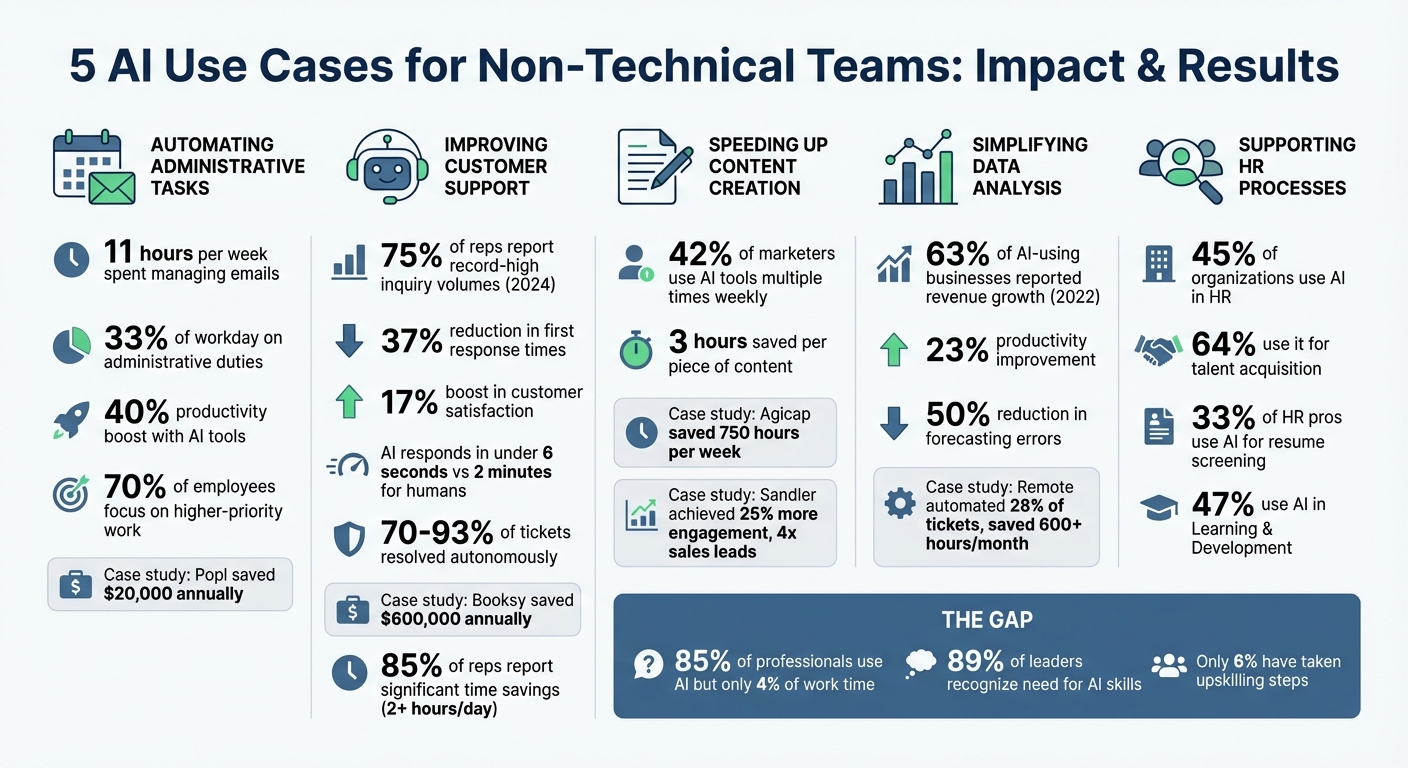
5 AI Use Cases for Non-Technical Teams: Key Statistics and Time Savings
The 4 AI Agents Non-Technical People Actually Need (And How to Use Them Today)
1. Automating Routine Administrative Tasks
Administrative tasks can eat up a surprising amount of time. On average, knowledge workers spend 11 hours per week just managing emails. Add to that the 33% of their day spent on other administrative duties like meeting coordination, data entry, and document creation, and it’s clear how much of the workday is consumed by low-value activities.
AI tools are stepping in to handle these time-draining chores. For example, email management tools can sort your inbox, flag urgent messages, and even draft personalized responses. Meeting coordination software scans calendars to find the best times for everyone and generates detailed recaps complete with action items. When it comes to document creation, AI can take rough drafts and turn them into polished standard operating procedures (SOPs) or extract structured data from invoices and receipts. These tools are practical, immediately improving efficiency in day-to-day operations.
Take Popl, for instance. By automating their lead capture process with HubSpot, Salesforce, and OpenAI, they saved $20,000 annually while also filtering spam and enriching their lead data.
The results speak for themselves: employees using AI tools report a 40% boost in productivity, and 70% say it allows them to focus on higher-priority work. The best way to get started? Focus on "high-impact, low-complexity" tasks like summarizing meetings or managing email traffic. While AI can handle much of the heavy lifting, it’s crucial to keep human oversight in the loop - use AI to draft and streamline, but let humans make the final call. This balanced approach ensures accuracy while leveraging AI's strengths.
What makes AI particularly powerful for administrative tasks is its ability to understand context. Unlike older "if-then" systems that followed rigid rules, modern AI can interpret the nuance of a situation. For instance, it can read an email and determine whether it’s a customer complaint or a sales lead. This ability to make judgment calls based on context is what sets AI apart, making it an invaluable tool for transforming routine administrative workflows.
2. Improving Customer Support With AI Assistants
In 2024, customer service representatives faced unprecedented levels of inquiries, with 75% reporting record-high volumes. AI assistants have stepped in to tackle this challenge by managing repetitive tasks like answering FAQs, processing password resets, tracking orders, and handling basic troubleshooting. This allows human agents to focus on more complex and nuanced customer needs.
Companies integrating AI into their customer service operations are seeing impressive results. For instance, first response times have dropped by 37%, and organizations with advanced AI systems report a 17% boost in customer satisfaction. AI-powered chatbots deliver responses in under 6 seconds - far quicker than the average 2-minute response time for human agents. Platforms like Ada and Zowie are particularly effective, resolving more than 70% of customer inquiries without human involvement. Meanwhile, enterprise-grade solutions like Maven AGI can autonomously handle up to 93% of support tickets. These numbers highlight how AI is reshaping customer support.
Take Booksy as an example. In 2024, they adopted Zowie's AI platform, automating 70% of their customer service tickets and saving $600,000 annually. Similarly, Learn It Live deployed an AI chatbot trained on their internal knowledge base, cutting their support ticket volume by 40%.
For non-technical teams, no-code tools are making AI adoption more accessible. With no-code chatbot builders, teams can train bots using their own documentation, ensuring seamless handoffs to human agents when issues require emotional sensitivity or advanced problem-solving. As Matthew Finio from IBM Think puts it:
"The best results come from combining the speed and data insights of AI with the empathy and critical thinking people can provide".
Generative AI is also proving to be a major time-saver, helping service professionals reclaim over 2 hours each day. In fact, 85% of customer service reps report significant time savings thanks to AI. And with Gartner predicting that by 2028, at least 70% of customers will start their service interactions through conversational AI interfaces, the race is on to implement these technologies effectively.
Beyond immediate efficiency gains, non-technical teams can stay ahead by focusing on upskilling. Organizations like the Northwest Arkansas AI Innovation Hub (https://nwaai.org) offer practical resources to help teams adopt AI solutions and maximize their potential.
3. Speeding Up Content Creation for Marketing and Sales
Marketing and sales teams are responsible for crafting blog posts, social media captions, email campaigns, and sales materials - but AI is transforming how they get it all done. Today, about 42% of marketers rely on AI tools multiple times a week for writing and content generation. And the payoff? Teams are saving an average of three hours per piece of content, freeing up time for more strategic and creative work.
AI tools streamline the entire content creation process. They can generate ideas, topics, headlines, and campaign concepts in just minutes. From there, teams can use simple text prompts to produce first drafts for everything - whether it’s a LinkedIn post, a product description, or email copy. What’s more, a single piece of content can easily be repurposed into threads, carousel scripts, or newsletters. Just like automating administrative tasks or customer support, AI-powered content creation is reshaping workflows in a big way.
Consider Agicap, a fintech company that adopted HubSpot Breeze AI in 2025. By automating content and lead management tasks, they saved 750 hours per week and saw a 20% boost in deal velocity. Similarly, Sandler, a global training organization, achieved 25% more engagement and four times the number of sales leads by using AI to create tailored content experiences. Even Farfetch, the luxury fashion marketplace, used AI to experiment with email writing styles and subject lines, which led to a noticeable uptick in open and click-through rates.
For non-technical teams, the key is to provide clear prompts. Specify the target audience, tone, length, and purpose to ensure the AI generates accurate drafts. As Ramona Sukhraj from HubSpot explains:
"The shift from hours to minutes for first drafts means marketers spend more time on strategy and less on production".
Of course, it’s essential to fact-check statistics, infuse unique brand insights, and refine the tone to make content truly stand out. With these tools in hand, non-technical teams can work faster and smarter, producing high-quality content with less effort.
For those looking to get started, organizations like NWA AI (https://nwaai.org) provide hands-on training to help teams master AI tools and seamlessly integrate them into their daily workflows - no coding skills required.
sbb-itb-e5dd83f
4. Simplifying Data Analysis and Reporting
AI is changing the game for non-technical teams when it comes to data analysis. Tasks that once required knowledge of SQL, Python, or advanced Excel formulas can now be tackled with simple, plain-English questions. Tools like Power BI Copilot and Tableau Pulse make it possible to describe your query in everyday language, and the AI takes care of selecting the best visual format to present the data.
The impact of these tools is undeniable. In 2022, 63% of businesses using AI for decision-making reported revenue growth - up from just 22% in 2020. AI analytics tools also improve productivity by 23% and reduce forecasting errors by as much as 50%. By automating tedious tasks like cleaning and formatting data, AI allows teams to focus on drawing meaningful insights, making their work more effective and efficient.
Take Remote, for example - a company with only three IT staff managing 1,100 support tickets every month. They implemented an AI workflow using ChatGPT to sort and prioritize tickets. The result? 28% of their tickets were handled automatically, saving the team over 600 hours each month. That freed up time is now spent on more strategic initiatives instead of repetitive tasks.
To get the most out of AI-driven reporting, start with a clear objective. For instance, before generating a report, write a concise purpose like: "For [audience], show how [metric] changed over [period] and recommend [action]". Ensure your data is well-organized - use a single header row and avoid merged cells to help the AI process it accurately. And don’t forget to double-check the results by asking the AI to explain its calculations.
If you’re eager to explore these tools, NWA AI (https://nwaai.org) provides hands-on training to help teams integrate AI into their workflows without needing any coding experience.
5. Supporting HR and Employee Development
HR teams often juggle routine tasks like screening resumes, scheduling interviews, and addressing policy-related questions. AI is stepping in to simplify these processes, allowing HR professionals to focus on what truly matters - nurturing talent and fostering a strong workplace culture. In fact, 45% of organizations already use AI in HR, with 64% of them leveraging it specifically for talent acquisition. This shift ties neatly into AI's broader ability to streamline workflows across various non-technical areas.
Take resume screening, for example. AI can sift through hundreds of resumes in mere seconds, ranking candidates based on their skills and experience rather than superficial factors like formatting. It also automates interview scheduling by syncing with calendars to find common availability, eliminating the back-and-forth of email exchanges. Candidates can even book their own interview slots, making the process smoother for everyone involved. Notably, 33% of HR professionals using AI for recruiting rely on it to screen resumes.
AI goes beyond recruitment, too. Using Natural Language Processing, it can analyze employee feedback to uncover sentiment and identify recurring themes. Jeanne Meister, a Global HR Consultant, highlights the value of this technology:
"AI will not only increase efficiency by reducing the labor-intensive parts of the process, but more importantly improve the performance review itself by helping to remove subjectivity in the evaluation".
When it comes to employee development, AI offers a personalized touch. By analyzing individual skills and career goals, it recommends tailored resources like courses, mentors, or projects. This approach, adopted by 47% of organizations using AI in Learning and Development (L&D), helps employees see a clear path to growth and keeps them engaged.
For businesses looking to integrate AI into HR, it’s wise to start small. Focus on addressing your biggest bottlenecks - whether that’s resume screening or handling repetitive queries. Always keep human oversight in place to review AI outputs, especially in sensitive areas like hiring and performance evaluations, to avoid potential biases. As with other departments, AI is proving to be a game-changer for HR, enhancing efficiency and accuracy across the board. For teams wanting to explore AI without diving into coding, resources like NWA AI (https://nwaai.org) offer practical training options.
Conclusion
AI has become a game-changer for teams across industries. It’s streamlining everything from administrative tasks and customer support to content creation, data analysis, and HR processes. By taking over repetitive, detail-heavy tasks, AI frees up your time for the work that truly matters - whether that’s strategic thinking, creative problem-solving, or driving impactful results.
Despite its potential, there’s still a wide gap between AI awareness and its practical application. While 85% of professionals report using AI, it accounts for just 4% of their work time. This shows a huge opportunity waiting to be tapped. The best way forward? Start small. Pinpoint a single time-consuming task, introduce an AI-powered workflow, and measure the impact. The results can be impressive: some companies have saved over 600 hours a month by automating ticket handling, and personalized onboarding efforts have led to a 440% increase in webinar attendance.
However, adopting AI isn’t just about tools - it’s about skills too. While 89% of business leaders recognize the need for their teams to improve AI capabilities, only 6% have taken meaningful steps toward upskilling. Programs like those from NWA AI (https://nwaai.org) can bridge this gap, helping teams go beyond basic usage to create efficient, repeatable workflows - no coding required.
FAQs
How can non-technical teams start using AI to improve their workflows?
Non-technical teams can take their first steps into the world of AI by focusing on its practical uses and exploring tasks that can be automated without needing to write a single line of code. A great way to start is by introducing an AI literacy program that covers essential concepts like natural language processing and generative AI. Pair that with hands-on training using no-code tools - think workflow automation platforms or AI writing assistants - to help team members gain confidence and experiment with real-world applications.
Once the team has a grasp of the basics, it's time to pinpoint repetitive or time-consuming tasks that could benefit from automation. Examples might include drafting routine emails, summarizing lengthy documents, or managing support ticket workflows. Prioritize these tasks based on how impactful and simple they are to automate. Begin with a small pilot project using a no-code AI tool designed to fit your specific needs. Track its success with measurable outcomes like time saved or reduced costs, then expand gradually based on those results. Programs like those offered by NWA AI – Northwest Arkansas AI Innovation Hub provide workshops and labs that guide teams through adopting AI solutions - all without requiring technical skills.
How does AI improve customer support compared to traditional methods?
AI has transformed customer support by offering round-the-clock assistance that's not only quick but also tailored to individual needs. It can smartly direct inquiries to the right channels, adjust to unique customer preferences, and refine its responses over time by learning from previous interactions.
Compared to traditional approaches, AI slashes response times, reduces mistakes, and takes care of repetitive tasks effortlessly. This allows human agents to dedicate their energy to solving more intricate problems. The result? A smoother, more reliable experience for customers and a noticeable boost in team efficiency.
How can AI help non-technical teams analyze data more easily?
AI takes the complexity out of data analysis by automating the process of extracting, organizing, and analyzing information from sources like emails, documents, and more. It converts raw data into user-friendly formats, such as spreadsheets or dashboards, so anyone can access insights - no coding skills required.
This means non-technical teams can save time, minimize mistakes, and concentrate on making informed decisions, all without needing specialized technical knowledge.
Build real AI capability on your work
The AI training programs are part of how Northwest Arkansas is approaching AI adoption.
Get involvedRelated Articles

ROI and KPIs in AI Process Optimization
Measure AI impact with ROI and KPIs: set baselines, track hard and soft ROI, and monitor model, system, and business KPIs to validate performance and value.

How Blended Learning Improves AI Upskilling
Blended learning, online modules plus hands-on workshops, boosts AI skill retention, engagement, and real-world application for faster workplace upskilling.

5 Steps to Define AI Workflow Goals
Set measurable AI workflow goals in five steps: map processes, set SMART targets, pinpoint AI opportunities, define KPIs, and align with strategy.